Startup Fee: WAIVED! (Normally $50)
IQFeed Basic Service: $68/month *
IQFeed RT US Futures & Futures Options: $20/month* (Normally
$30/m)
RT US Stocks & Canadian Stocks: Included
IQFeed RT Equity Options: add $50/month
IQFeed RT International Futures: add $25/month
*Exchange Fees Extra for Real-Time Data, consult IQFeed web
site for any changes in pricing.
CLICK
HERE to subscribe with this special offer
LIMITS:
1. The total number
of symbols in your IQFeed database must
NOT exceed your IQFeed subscription limit (by default 500
symbols)
2.
You
can not use more than 5 million ticks/bars per symbol due
to problem in IQConnect.
|
TUTORIAL: HOW TO USE AMIBROKER WITH IQFEED REAL
TIME DATA
One-time setup
IMPORTANT: IQFeed provides unfiltered data. This
means that no tick is filtered out therefore you may see a lot of bad
ticks. This will change when IQFeed implements bad tick filter.
If you don't have IQFeed CONNECTION MANAGER already installed
you have to install it first.
Setting up with IQFeed VIDEO TUTORIAL:
http://www.amibroker.com/video/IQFeed.html
To use AmiBroker with IQFeed you will need to perform
a one-time setup described below:
- Run AmiBroker
- Choose File->New database
- Type a new folder name (for example: C:\Program Files\AmiBroker\IQFeed
) and click Create as shown in the picture below:
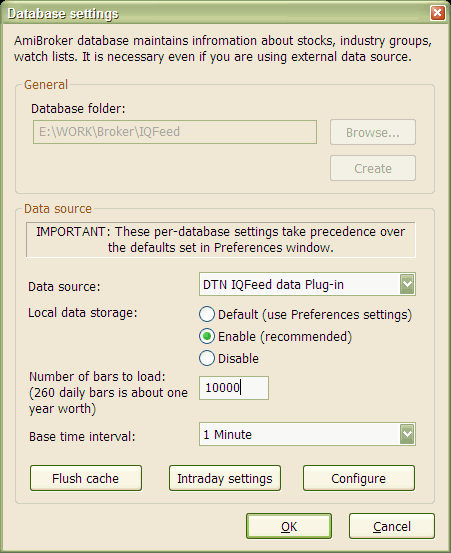
- Choose DTN IQFeed data Plug-in from
Data source combo and "Enable" from Local data storage
- Now choose Base time interval. Select 1-minute
- Enter appropriate number of bars to load:
100000 for 1-minute database to get max history (8 months) available
from IQFeed
- Click on "Intraday Settings". Check "Allow
mixed EOD/Intraday data" box. Click OK
- Click OK.
From now on your AmiBroker reads quotes directly from
the IQFeed.
Adding symbols
To add symbols just use Symbol->New menu and enter
comma separated list of ticker symbols you want to add.
Showing real time quote window
|
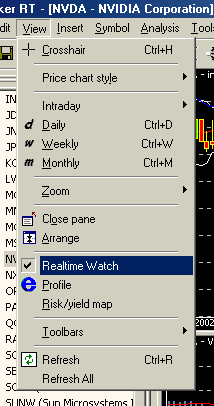
AmiBroker RT features real-time watch
window that allows you to watch streaming quotes. To show this
window choose View->Realtime Quote menu. (see image
to the right ---->)
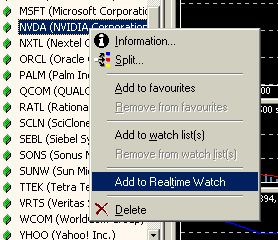
To add symbols to Realtime quote window you
either double click on the symbol tree or use right mouse button
menu Add to Realtime quote option as shown in the picture above.
|
 |
Working with real time quote window
The RT quote window provides real-time streaming quotes
and some basic fundamental data. It is fairly easy to operate as shown
in the picture below.
|